


















Lesson 1 of 46 · Getting Started
Course Map: How This RF and Antenna Course Works
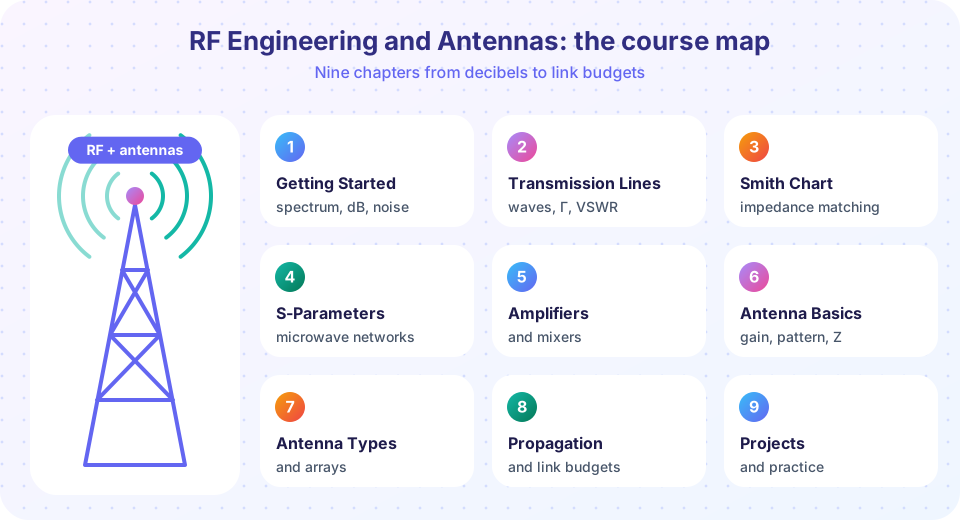
Start here: who the RF engineering and antennas course is for, what you need to know, how the nine chapters fit together and how to study with the live tools.
Radio is invisible, yet it carries your phone calls, your Wi-Fi, your car's radar and the position fix on your map. RF engineering is the craft of making those invisible signals do useful work: generating them, guiding them along cables and circuit boards, amplifying them, sending them into the air with an antenna and pulling them back out of the noise at the other end.
This course takes you from "what is a decibel?" to "will this link close?". Every idea comes with a picture, a worked example with numbers and a small live tool you can change and run. You do not need a lab. The tools are simulations and calculators that apply the same equations a real design uses.
What you will learn
- What the nine chapters cover and why they come in this order.
- Which background you need and what you can safely skip.
- How to study each lesson: read, predict, run, check.
- What the live tools in this course are, and what they are not.
Who this course is for
- Students of electrical or electronic engineering (about age 17 and up) who meet RF in a university course.
- Hobbyists (amateur radio, drone, ESP32 and software-defined-radio builders) who want to understand why a cable, a matching network or an antenna behaves the way it does.
- Engineers from other fields (digital, power, software) who have to work with an RF module and want a clear mental model.
Prerequisites
You need Ohm's law, the idea of a sine wave (amplitude, frequency, phase), and a little algebra with logarithms. Complex numbers (a + jb) are used a lot; this course uses j for the imaginary unit, as electrical engineers do. If you have met capacitors and inductors, even better: a capacitor has impedance 1/(jωC) and an inductor jωL. The course reminds you of both when they appear.
The nine chapters
Part 1: the basics
- Getting started
- Transmission lines
- Smith chart
Numbers, wires and matching.
Part 2: circuits
- S-parameters
- Amplifiers, mixers
How RF building blocks are described and built.
Part 3: antennas
- Antenna basics
- Types and arrays
Turning signals into radio waves.
Part 4: the link
- Propagation
- Projects
Will the link close?
How to study each lesson
- Read the outcomes under "What you will learn" and the key terms. Say them aloud if you can.
- Predict before you run. When a worked example says "find the reflection coefficient", do it on paper first. Then check against the tool.
- Change one number at a time in the live tools. The goal is to learn which knob does what: double the frequency, halve the load, add 3 dB.
- Take the quiz at the end without looking back. Wrong answers are the most useful part, because every explanation tells you what to fix.
- Revisit chapter reviews a week later. Spaced recall beats rereading.
About the live tools
Everything runnable in this course is either a calculator (it applies a formula you have just learned) or a simulation (it solves the circuit equations on your computer). None of it is a measurement of real hardware. When a real instrument such as a vector network analyzer matters, the lesson describes what you would see and labels any numbers as examples. Real RF work always ends with measurement, and this course tells you where that step belongs.
Python tools run in your browser with numpy and matplotlib. The first run loads the Python runtime and may take a few seconds. The small HTML tools run instantly.
Common misconceptions
- "RF is just high-frequency electronics." Frequency itself is not the point. What changes is the ratio of the circuit size to the wavelength. Once a wire is a tenth of a wavelength long, it stops acting like a simple connection and starts acting like a transmission line.
- "More power fixes a bad link." Sometimes. But a poor match, a noisy receiver or a badly aimed antenna can cost far more than the extra watts give back. Chapter 8 shows how to find where the decibels go.
Try it
First, a wavelength calculator. Wavelength is the length scale that decides almost every RF design choice, so it is a good place to start. Move the slider and watch how a quarter wavelength compares with the board sizes you know.
Second, a teaser for the end of the course: how fast a radio signal fades with distance in free space. Do not worry about the formula yet; chapter 8 derives it.
Press Run (or Ctrl + Enter) to see the result here.
Program input · what you'd type while the program runs
Type the answers before you press Run, one per line. Each time the program reads a line (with input()), it gets the next line from this box.
Check your understanding
Quick check · 4 questions
of 4 answered You scored / 4 · perfect!
-
1. Which situation makes a wire start to behave like a transmission line?
Wire behavior depends on length compared with wavelength, not on current, voltage or material. Beyond about λ/10, delay and reflections matter. -
2. Which chapter of the course introduces the Smith chart?
Chapter 3, Smith Chart and Matching. Chapter 2 prepares the ground with waves and transmission lines. -
3. What are the live tools in this course?
The tools compute with the equations in the lesson. Real measurements are described but not performed here. -
4. What is the best way to use a worked example?
Predicting first turns the example into practice and shows what you do not yet understand.
Summary
- The course follows the signal: numbers and noise, wires, matching, networks, amplifiers, antennas, the radio path and finally projects.
- Wavelength, not frequency alone, decides whether a circuit is "RF".
- Study actively: predict, run, change one number, then take the quiz.
- The live tools are calculators and simulations, not measurements.
Track your progress
Create a free account to tick off lessons and pick up where you left off on any device.
of RF Engineering and Antennas lessons completed