


















Lesson 1 of 46 · Getting Started
Course map: how this analog electronics course works
Meet the nine chapters of this analog electronics course, see who it is for, what you need to know first, and how to study it with live simulations.
Every phone, radio, hearing aid, guitar amplifier and sensor board has an analog heart. The world produces smooth, continuous signals: sound pressure, light, temperature, voltage on a nerve. Before a computer can count them, analog circuits have to sense, amplify, filter and clean them. Digital chips even need analog power supplies to run. This course teaches you how those circuits work and, more importantly, how to think about them.
You will not memorize a catalog of circuits. You will learn a small set of ideas (Ohm's law, the diode curve, the transistor as a controlled current source, negative feedback) and see how every circuit in the real world is a combination of them.
What you will learn
- Who this course is for and what you should know before starting
- The nine chapters and how each one builds on the one before
- How the lessons are structured and how to use the live simulations
- Basic safety rules for building real circuits
Key terms
Analog signal: a voltage or current that can take any value in a range and changes smoothly with time.
Circuit: a closed path of connected components through which current can flow.
Simulation: a program that solves the equations of a circuit for you. The ones here are real calculations, but they are models, not lab measurements.
Bias: the steady (DC) voltages and currents that put a device in the right working region before any signal arrives.
Who this course is for
The course suits three kinds of learners:
- Students aged about 16 and up taking physics, engineering or technology courses who want a clear picture of electronics beyond the exam formulas.
- Makers and programmers who wire up Arduino or Raspberry Pi projects and want to know why a resistor value matters.
- Adults refreshing the subject before a degree, a repair hobby or a new job.
You need comfortable algebra (rearranging equations, working with powers of ten), a little graph reading, and a rough idea of what voltage and current are. You do not need calculus: where a derivative or exponential appears, we explain it in words and let the simulations do the arithmetic. Programming experience is helpful but not required; the Python examples are short and every one is explained.
The nine chapters
Part 1: the basics
Part 2: building amplifiers
Op amps make precise gain easy.
Part 3: whole systems
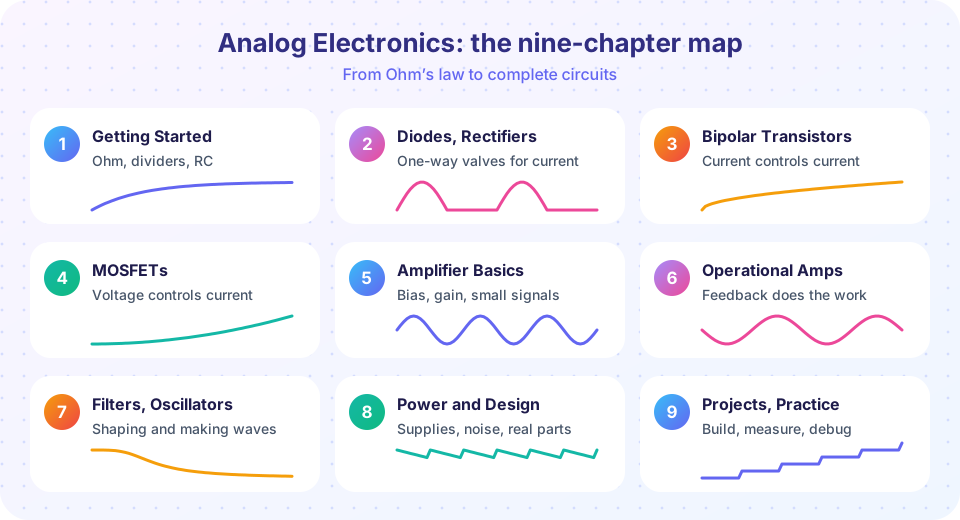
Chapter 1, Getting Started, refreshes the tools you will use constantly: Ohm's law, Kirchhoff's laws, voltage dividers, Thévenin equivalents and the RC time constant. Chapter 2 introduces the first nonlinear part, the diode, and builds rectifiers and regulators from it. Chapters 3 and 4 cover the two transistor families that every amplifier and every chip is made of. Chapter 5 turns transistors into amplifiers with proper biasing. Chapter 6 introduces the operational amplifier and negative feedback, the most powerful idea in analog design. Chapter 7 uses those building blocks for filters and oscillators. Chapter 8 deals with power supplies, noise and the practical details of real parts. Chapter 9 gathers projects and practice problems.
How each lesson works
Every content lesson has the same layout so you always know where you are:
- What you will learn and Key terms tell you the goal and the vocabulary.
- A body of worked examples with numbers and an illustration near the top.
- Common misconceptions, the beliefs that trip learners up.
- Try it, interactive code that runs in your browser.
- Check your understanding, a short quiz with explanations.
- A Summary and a link to the next lesson.
Do the quiz before reading the summary. Retrieving an idea from memory teaches you more than rereading it. Work each numeric example on paper first, then run the simulation and compare. If they differ, find out why; that is where the learning happens.
About the simulations
The Python examples run real numerical code (NumPy and Matplotlib) in your browser. They solve circuit equations, plot curves and sweep component values. The HTML widgets are small interactive models with sliders. They are demonstrations of the equations, not full circuit simulators like SPICE, and they use idealized parts unless a lesson says otherwise. Real components have tolerances: a 5 % resistor may be off by 5 %, and a transistor gain can differ from one specimen to the next by a factor of two. When a number in a lesson is "typical", it is typical, not guaranteed.
Safety first. Everything in this course can be built at low voltage from batteries or a bench supply below 30 V. Never connect experiments to mains electricity (the wall socket). Mains voltage can kill, and nothing in this course requires it. Capacitors can hold charge after power is removed; discharge them through a resistor before touching a circuit. Always check polarity on electrolytic capacitors and LEDs.
Common misconceptions
"Analog is obsolete." Digital circuits still need analog front ends (amplifiers, filters, converters) and analog power supplies. Radio, audio, sensors and power electronics are all analog at their core.
"I need expensive equipment." A multimeter, a breadboard and a handful of parts cover most of the experiments. Simulations fill the rest.
"Electronics is just formulas." The formulas are short; the skill is deciding which approximation to use. You will practice that throughout.
Try it
The first demo is a classic: choose a voltage and a resistance and see the current and power. Ohm's law is the first formula in the course and the one you will use most.
The second demo uses Python to list standard resistor values. Real resistors come in preferred values (the E12 series has 12 values per decade), so you will often pick the nearest standard value to a calculated one.
Press Run (or Ctrl + Enter) to see the result here.
Program input · what you'd type while the program runs
Type the answers before you press Run, one per line. Each time the program reads a line (with input()), it gets the next line from this box.
Check your understanding
Quick check · 4 questions
of 4 answered You scored / 4 · perfect!
-
1. Which description best fits an analog signal?
An analog signal is continuous in value and time. A sine wave is only one example. -
2. Which maths do you need for this course?
Algebra and graphs are enough. Calculus ideas are explained in words and handled by the simulations. -
3. What does the word bias mean in electronics?
Bias is the DC operating point. Signals then ride on top of it. -
4. Why should you not connect course experiments to the wall socket?
Mains electricity can kill. All experiments here run safely on batteries or a low-voltage bench supply.
Summary
- The course has nine chapters that go from Ohm's law to complete projects.
- You need algebra and curiosity; calculus is not required.
- Each lesson has goals, worked examples, simulations and a quiz.
- Simulations are demonstrations; real parts have tolerances.
- Never experiment with mains electricity.
Track your progress
Create a free account to tick off lessons and pick up where you left off on any device.
of Analog Electronics lessons completed