
























Lesson 10 · Cuts and Continuity
Why and When to Cut
Learn why editors cut, how shot sizes answer different questions, how to find a good cut point, and how to avoid cuts that confuse or distract viewers.
A cut is an instant change from one shot to another. It is the most common edit in video, and it is easy to make. The hard part is knowing why to make it.
A good cut gives the viewer something they want or need at that moment: new information, a reaction, a closer look or a new place. A cut with no reason can feel nervous or random.
What you will learn
- Common reasons to cut
- How shot sizes work together
- How to find a good cut point
- When it is better not to cut
Reasons to cut
| Reason | Example |
|---|---|
| Show new information | Cut from a person to the message on their phone |
| Show a reaction | A friend's face as they hear surprising news |
| Show detail | Close-up of fingers tying a knot |
| Show the space | Wide shot to explain where everyone stands |
| Move in time or place | From the kitchen to the dinner table later |
| Remove what is not needed | Skip a long walk across a room |
| Guide attention | Look at what a character looks at |
Before you cut, try to finish this sentence: "I cut here because the viewer now needs to..." If you cannot finish it, test the sequence without the cut.
Shot sizes work together
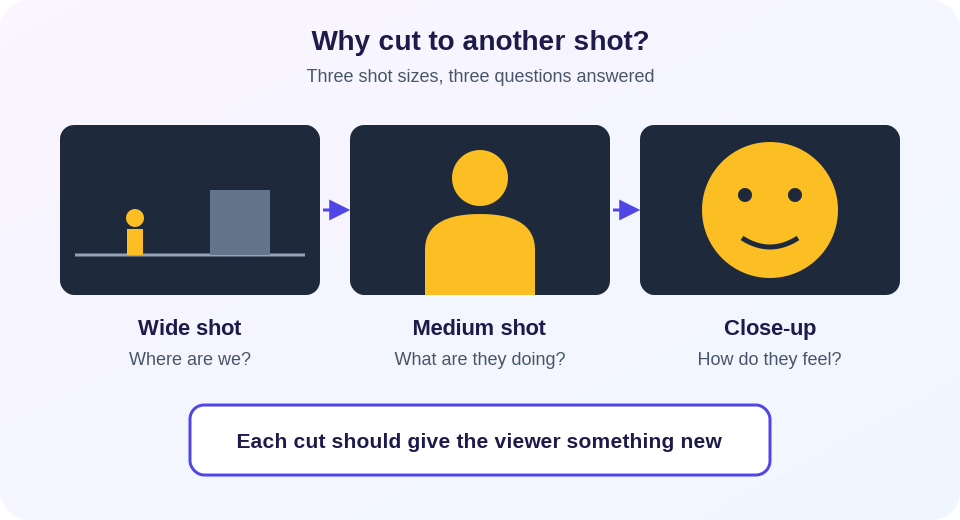
A sequence often moves between shot sizes:
- A wide shot sets up where things are.
- A medium shot shows what people are doing.
- A close-up shows detail or emotion.
You do not need to follow this order. Starting on a close detail can make viewers curious: what is it, and where are we? Then a wider shot answers.
Cuts between shots that differ clearly in size or angle usually feel smoother than cuts between two nearly identical views. You will see why in Jump Cuts and Transitions.
Finding the cut point
A few places often work well:
- At the end of a thought. When a speaker finishes an idea, you can cut to a reaction or to B-roll.
- During an action. Cutting while something moves can hide the join. See Match Cuts and Cutting on Action.
- On a look. A person glances to the side, then you show what they see.
- On a sound or beat. A door closing or a musical accent can support a cut.
- After a reaction begins. Sometimes it is worth holding a moment so the viewer sees the face change.
Play the cut several times. Move it a few frames earlier or later with a roll or ripple trim. Small changes can make a big difference in feel.
Give shots enough time
How long should a shot stay on screen? There is no single correct number. It depends on:
- How much there is to see. A busy wide shot usually needs more time than a simple close-up.
- How familiar it is. Viewers read a familiar face faster than an unfamiliar diagram.
- The mood. A calm scene may use longer shots. An exciting one may use shorter ones.
- Text. If there is text to read, give enough time to read it comfortably, and a little more.
A helpful test: when you watch, notice when you feel you have "got it". If you wait long after that, the shot may be too long. If it disappears before you understand it, it is too short. Then ask a fresh viewer, because you have seen the shot many times.
When not to cut
Sometimes the best edit is to stay.
- A speaker pauses before saying something important. The silence has meaning.
- A performance is better when you see it unbroken, such as a dance move or a skill that must look real.
- A single shot already shows everything the viewer needs.
Cutting too often can also make it harder to understand space and action.
A worked example
A boy opens a birthday gift. Compare two versions:
Version 1: wide shot of the table (3 s), close-up of hands tearing paper (2 s), close-up of face as he sees the gift (3 s), insert of the gift (2 s), medium shot of a hug (3 s).
Version 2: one wide shot of the whole event (13 s).
Version 1 guides the viewer's eyes and shows the reaction clearly. Version 2 may feel more honest and calm, but the face may be too small to read. Neither is "right". Choose based on your goal. Note that both versions use 13 seconds. Cutting changes what the viewer notices, not only how fast the video feels.
Honest editing
Cuts can change meaning. If you cut an answer so that a person seems to say something they did not mean, that is misleading. In documentaries, news and interviews, keep the speaker's meaning intact. Rules and professional standards differ by country and field.
An exercise with your own footage
Film a one-minute scene, such as someone preparing tea, from a few different angles. Make two edits from the same clips.
- In the first edit, cut only when the viewer needs something new.
- In the second, cut about every two seconds, whatever happens.
Watch both without stopping. In which version can you follow the actions more easily? Where does the second version hide something important? Which cuts in the first version could you remove with no loss?
Then turn off the sound and watch again. You may notice that some cuts work only because the voice explains them. That is not always a problem, but it is useful to know.
Common mistakes
- Cutting only because a few seconds have passed.
- Cutting between two almost identical angles by accident.
- Leaving text on screen too briefly to read.
- Changing the meaning of what someone said.
Try it
The "plus one second" in this tool is only a planning cushion, not a standard.
Check your understanding
Quick check · 4 questions
of 4 answered You scored / 4 · perfect!
-
1. What makes a good cut?
A cut should have a purpose for the viewer. -
2. Which shot most often helps explain where people are?
A wide shot shows the space and positions. -
3. When might it be better not to cut?
Staying on a shot can keep meaning and honesty. -
4. A busy wide shot usually needs what, compared with a simple close-up?
Viewers need longer to read a shot with more in it.
Summary
- Cut for a reason: information, reaction, detail, space, time or attention.
- Wide, medium and close shots answer different questions.
- Good cut points often come at thoughts, actions, looks or sounds.
- Shot length depends on content, familiarity, mood and text.
- Keep the speaker's meaning honest.
Track your progress
Create a free account to tick off lessons and pick up where you left off on any device.