


















Lesson 145 of 201 · Desktop GUI
Java GUI Overview: AWT, Swing and JavaFX
Compare Java's desktop GUI toolkits - AWT, Swing and JavaFX - their history and design, where desktop Java is used today, headless mode and how to run GUI code locally.
Everything you've written so far in this course talks to the user through text: a console, an Input box, a log. Java can also build desktop applications with windows, buttons, menus, tables and charts. In fact, it ships with not one but two GUI toolkits in the JDK, AWT and Swing, and a third, JavaFX, is available as a separate open-source project.
This chapter teaches you how those toolkits work: their building blocks, their event model and the threading rule that every GUI programmer must follow. This first lesson gives you the big picture: where each toolkit came from, how they differ, where desktop Java is used today, and how to run GUI programs on your own computer. It also explains why the GUI examples in this chapter are read-only here, and what you can run in our editor to understand the ideas behind them.
Three toolkits, one language
Java's GUI story has three main chapters.
AWT, the Abstract Window Toolkit (Java 1.0, 1996). AWT wraps the operating system's own widgets. When you create a java.awt.Button, AWT asks Windows, macOS or Linux to create a real native button (called a peer) and draws nothing itself. That made AWT look native, but it could offer only the widgets that every platform had, and behavior differed subtly between systems. Today AWT survives mainly as the foundation the other toolkits stand on: windows, colors, fonts, images, Graphics2D drawing, the clipboard and the event classes.
Swing (bundled with Java 1.2, 1998). Swing turned the idea around. Apart from top-level windows, Swing components are lightweight: Java paints every pixel of a JButton or JTable itself, using the Java 2D graphics API, inside a single native window. A pluggable look and feel decides how the painting looks (the cross-platform "Metal" and "Nimbus" looks, or imitations of Windows and GTK). The result: a huge, consistent component set (tables, trees, rich text, tabbed panes, file choosers) that works the same everywhere. Swing is still part of every JDK, still maintained and fully supported.
JavaFX (2008; Java API since 2011). JavaFX was designed as Swing's modern successor. Instead of components painting themselves, a JavaFX window shows a scene graph, a tree of nodes rendered by a hardware-accelerated engine. It adds CSS styling, animations, effects, charts, media playback, an embedded web view and properties with data binding. JavaFX was bundled with Oracle JDK 8, then moved out of the JDK in Java 11; it now lives on as OpenJFX, an open-source project with its own release train that tracks the JDK versions.
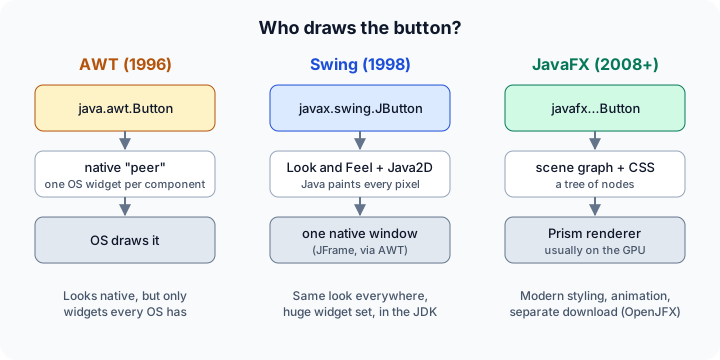
Comparing the toolkits
| AWT | Swing | JavaFX | |
|---|---|---|---|
| Package | java.awt |
javax.swing |
javafx.* |
| In the JDK? | Yes (java.desktop module) |
Yes (java.desktop module) |
No: add the OpenJFX libraries |
| Who draws widgets | The operating system | Java (Java 2D) | Java (scene graph, GPU rendering) |
| Component set | Small | Very large and mature | Large, modern controls and charts |
| Styling | Hardly any | Look-and-feel classes, code | CSS files |
| Layout | Layout managers | Layout managers | Layout panes (VBox, BorderPane, GridPane) |
| Data binding | No | Models and listeners, by hand | Built-in properties and bindings |
| UI from markup | No | No (GUI builders generate code) | FXML files and Scene Builder |
| UI thread | Event dispatch thread | Event dispatch thread | JavaFX Application Thread |
| Typical use today | Building block only | Large existing apps, IDEs, tools | New desktop apps, rich visual UIs |
A fourth toolkit you may meet is SWT from the Eclipse project, which wraps native widgets like AWT but with a much richer set; the Eclipse IDE is built on it. Kotlin developers also use Compose Multiplatform for desktop apps on the JVM. Both are outside the JDK and this course.
Which one should you learn?
- Maintaining or extending an existing desktop app? It's very likely Swing. Many large in-house business tools, trading front ends, scientific and engineering programs, and the IntelliJ-based IDEs are Swing applications.
- Starting a new desktop app in Java? JavaFX is the more modern choice, especially if you want styling with CSS, animations or charts.
- Just learning GUI concepts? Either works. Components, containers, layout, events, models and the single UI thread appear in both, so the knowledge transfers. This chapter covers Swing basics, Swing events and a small app, and an introduction to JavaFX.
Where desktop Java fits today
Most new user-facing software is built for the web or for phones, and Java is hugely popular there too, just on the server side (see the Advanced Java track) and on Android (which uses its own UI toolkit, not Swing or JavaFX). Desktop Java still matters wherever a program needs to run offline, handle large local data sets, integrate with hardware or files, or simply already exists and works. Developer tools, database clients, point-of-sale terminals, lab software, chart and trading workstations and internal admin tools are typical examples.
Modern Java also makes desktop apps easier to ship than before. With the jpackage tool (Java 16+), you can turn your application and a trimmed Java runtime into a native installer (.msi, .dmg, .deb), so your users don't need to install Java themselves.
Why the GUI examples here are read-only
Our editor compiles and runs Java on a server, not on your computer. That server has no screen: no display, no window system, no installed fonts. Java detects this and runs in headless mode, where anything that needs a real window throws a HeadlessException. Run this to see what the server reports:
Press Run (or Ctrl + Enter) to see the result here.
Program input · what you'd type while the program runs
Type the answers before you press Run, one per line. Each time the program reads a line (with IO.readln() or a Scanner), it gets the next line from this box.
So Swing itself is installed (it's part of java.desktop), but windows can't open, and JavaFX isn't there at all, just like on a plain JDK on your computer. Headless mode isn't only a sandbox limitation: servers use it on purpose to generate images, PDFs and charts with AWT's drawing classes without a screen. You can force it locally with java -Djava.awt.headless=true.
The good news: a GUI is much more than pixels. Components are ordinary Java objects, events are ordinary method calls, and the data behind a table or list lives in model objects that don't need a screen at all. The runnable examples in this chapter focus on exactly those parts.
Components are just objects
A Swing user interface is a tree of components. Top-level windows (JFrame, JDialog) contain panels (JPanel), and panels contain other panels, labels, buttons and text fields. Every container is itself a component, so you can nest them as deep as you like. This is the Composite design pattern in action.
Apart from the window itself, you can create and assemble these objects without a display. The example builds the component tree of a small sign-in form and walks it recursively, the way layout managers and painting code do internally:
Press Run (or Ctrl + Enter) to see the result here.
Program input · what you'd type while the program runs
Type the answers before you press Run, one per line. Each time the program reads a line (with IO.readln() or a Scanner), it gets the next line from this box.
The imports are explicit on purpose. A compact source file already imports java.util.List, but import java.awt.*; would bring in java.awt.List, an old AWT list widget, and on-demand package imports win over the automatic module import. Your List<String> would then fail to compile with "type List does not take parameters". In GUI code, import AWT classes one by one (or write java.util.List in full).
Events: the core of every GUI
A console program decides what happens next: it asks a question and waits. A GUI program reacts. It builds its window, then sits idle until the user does something. Each click, key press or mouse move becomes an event object, and the toolkit calls every listener registered for that kind of event on that component. This is the Observer pattern, and it's the same idea in AWT, Swing and JavaFX.
You can trigger events without a mouse: doClick() presses a button programmatically, exactly as a user's click would, which is also how automated GUI tests work.
Press Run (or Ctrl + Enter) to see the result here.
Program input · what you'd type while the program runs
Type the answers before you press Run, one per line. Each time the program reads a line (with IO.readln() or a Scanner), it gets the next line from this box.
Notice that the disabled button ignored doClick(), just as it would ignore a real click. Also look at the order of the output: the two listeners both ran before doClick() returned, so events are plain, synchronous method calls. Swing happens to call them newest-first, but the order isn't part of the contract, so never write listeners that depend on it. In a real application these events would arrive on a special thread, the event dispatch thread; the next lesson explains why that matters so much.
Running GUI programs on your computer
To run the read-only examples in this chapter, you need a JDK installed locally (see How Java Works).
Swing needs nothing extra. Save a file such as Hello.java and launch it directly:
import javax.swing.*;

public class Hello {
    public static void main(String[] args) {
        SwingUtilities.invokeLater(() -> {
            JFrame frame = new JFrame("Hello, Swing");
            frame.add(new JLabel("It works!", SwingConstants.CENTER));
            frame.setSize(320, 160);
            frame.setDefaultCloseOperation(JFrame.EXIT_ON_CLOSE);
            frame.setLocationRelativeTo(null);       // center on screen
            frame.setVisible(true);
        });
    }
}
java Hello.java
JavaFX needs the OpenJFX libraries. For a quick test, download the JavaFX SDK for your platform from the OpenJFX project, unzip it and point the launcher at its lib folder:
java --module-path /path/to/javafx-sdk/lib --add-modules javafx.controls HelloFX.java
For real projects, let a build tool fetch JavaFX for you: Maven and Gradle have JavaFX plugins (see Build Tools). Some JDK distributions (for example, Azul Zulu FX and BellSoft Liberica Full) bundle JavaFX, which saves this step. IDEs such as IntelliJ IDEA, Eclipse and NetBeans can run both kinds of programs with one click, and Scene Builder lets you design JavaFX screens visually.
Keep your application logic in plain classes that don't import any GUI package: calculations, validation, data loading. That code can be unit-tested and reused (even behind a web UI later), and the GUI layer stays thin. The Swing events lesson shows this with a temperature converter.
Check your understanding
Quick check · 5 questions
of 5 answered You scored / 5 · perfect!
-
1. What is the key difference between how AWT and Swing draw a button?
AWT components have native peers drawn by the OS. Swing components are lightweight and painted by Java inside one native window, using the current look and feel. -
2. You install a standard JDK 25 and try to compile a JavaFX program with
javac HelloFX.java. What happens?JavaFX was removed from the JDK in Java 11 and is distributed separately as OpenJFX (unless your JDK distribution bundles it). Swing and AWT are still included. -
3. What does this print on a server without a display?
try { new JFrame(); IO.println("A"); } catch (HeadlessException e) { IO.println("B"); }In headless mode, creating a top-level window throws HeadlessException. Lightweight components such as JButton and JLabel can still be created. -
4. A compact source file has
import java.awt.*;and declaresList<String> names = new ArrayList<>();. Why does it fail to compile?On-demand package imports shadow the automatic java.base module import, so List refers to the AWT widget class java.awt.List. Import AWT classes individually or write java.util.List. -
5. Which statement about desktop Java today is accurate?
Swing is still shipped and supported, and large applications such as the IntelliJ-based IDEs use it. JavaFX (OpenJFX) is a common choice for new desktop UIs. Android has its own UI toolkit.
Summary
- Java has three GUI toolkits: AWT (native widgets, now mostly a foundation), Swing (lightweight components painted by Java, in the JDK) and JavaFX (scene graph, CSS, bindings, separate OpenJFX download since Java 11).
- All three share the same core ideas: a tree of components or nodes, layout, events with listeners, and a single UI thread.
- Swing dominates existing desktop apps; JavaFX is the modern choice for new ones;
jpackagebuilds native installers. - Our editor runs on a server in headless mode, so windows can't open. Components, events and models still work, and the runnable examples use them.
- Import AWT classes individually, because
import java.awt.*;makesListmeanjava.awt.List. - Locally, run Swing with
java Hello.java; JavaFX needs--module-pathand--add-modules, or a build tool plugin.
Next: Swing Basics, where you'll build windows with frames, panels, labels, buttons and layout managers.
Track your progress
Create a free account to tick off lessons and pick up where you left off on any device.
of Java lessons completed