


















Lesson 2 of 122 · Getting Started
A Short History of HTML
How HTML grew from a short list of tags at CERN into today's Living Standard, what "HTML5" really means, and why every page still starts with a doctype.
You do not need to know history to write good HTML. But a little background explains a lot of things that otherwise look strange: why some elements have odd names, why old tutorials teach tags you should never use, why everyone still says "HTML5", and why every page starts with the curious line <!DOCTYPE html>.
This lesson is a quick tour of about thirty-five years of the web. There is nothing to memorize — read it like a story, and try the two small experiments along the way.
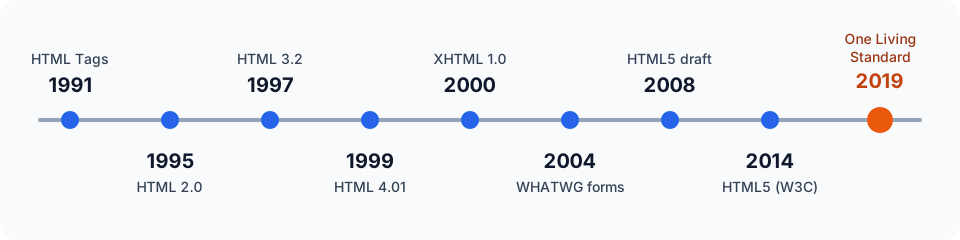
1989–1991: an idea at CERN
In 1989, Tim Berners-Lee, a British scientist working at CERN (the European particle physics laboratory near Geneva), wrote a proposal for sharing documents between computers using hypertext — text that contains links to other text. By the end of 1990 he had built the three pieces the idea needed:
- HTML, a simple language for marking up documents,
- HTTP, the protocol for requesting and sending those documents,
- and the first web browser and web server to put them to work.
In 1991 he described the language in a short public note usually called HTML Tags. It listed fewer than two dozen elements. Some of them are still exactly the same today: headings from <h1> to <h6>, <p> for paragraphs, <a> for links, <ul> and <li> for lists, <dl> for definition lists and <address>. Notice what is missing: there were no images, no tables, no forms and no colors. The early web was a library of linked text.
HTML was not invented from nothing. Its angle-bracket syntax was borrowed from SGML, a much older and much more complicated system for marking up documents. That family resemblance will come back later in our story.
Every element in that example would have made sense in 1991, and every one of them is still valid HTML today. Few technologies can say that.
The 1990s: growth and the browser wars
Once the web left CERN, it spread fast. In 1993 the Mosaic browser added inline images with a new <img> element, and suddenly the web looked like a magazine rather than a library catalog. Netscape Navigator (1994) and Microsoft's Internet Explorer (1995) followed, and the two companies raced to win users by inventing new tags of their own. Netscape had <blink>; Microsoft had <marquee>. Pages often worked well in only one of the two browsers.
Standards bodies tried to keep up:
- HTML 2.0 (1995) was published by the IETF and wrote down what browsers already did, including forms.
- The World Wide Web Consortium (W3C), founded by Berners-Lee in 1994, took over the work.
- HTML 3.2 (1997) added tables and also some purely visual features such as the
<font>element and the<center>element. - HTML 4.0 (1997) and its corrected version HTML 4.01 (1999) pushed the other way: they told authors to move visual styling out of HTML and into CSS, keeping HTML for structure and meaning.
That last idea — HTML describes what content is, CSS describes how it looks — is still the foundation of everything you will learn on this site. The presentational tags from that era are now obsolete; the Deprecated and Obsolete Features lesson lists them along with their modern replacements.
2000–2009: the XHTML detour
At the turn of the century, XML was the exciting new technology, and the W3C decided HTML's future lay there. XHTML 1.0 (2000) was HTML rewritten with XML's strict rules: every tag lowercase, every element closed (<br />), every attribute quoted.
Many developers adopted the XHTML style, but almost every site still sent its pages as ordinary HTML, so browsers read them with their forgiving HTML parsers anyway. The truly strict XML mode — where one typo stops the whole page from displaying — was something few sites dared to use.
The W3C then began XHTML 2.0, a clean break that was deliberately not compatible with existing pages. Browser makers were not convinced. In 2004, people from Apple, Mozilla and Opera formed a new group, the Web Hypertext Application Technology Working Group (WHATWG), to evolve HTML step by step instead — adding features for web applications while keeping every old page working.
The W3C eventually joined that approach: it adopted the WHATWG's work as the starting point for "HTML5" in 2007 and stopped work on XHTML 2.0 in 2009. You can read more about the XML syntax, which still exists, in HTML vs XHTML.
HTML5 and the Living Standard
The new specification did two big things.
First, it defined exactly how to parse HTML, including broken HTML. Before this, every browser repaired bad markup in its own way. Now there is one precise algorithm, so all modern browsers build the same page from the same code, mistakes included.
Second, it added the features modern sites needed: <video> and <audio>, <canvas>, semantic elements such as <article>, <nav> and <header>, new input types such as email and date, and many JavaScript APIs.
The W3C published HTML5 as a Recommendation in October 2014, followed by HTML 5.1 and 5.2. Meanwhile, the WHATWG had dropped version numbers altogether and called its document the HTML Living Standard: one specification, updated continuously as browsers ship new features. For a few years two slightly different HTML specifications existed side by side, which was confusing for everyone.
In 2019 the two organizations signed an agreement: the WHATWG maintains the single HTML standard, and the W3C reviews and endorses snapshots of it. Today there is only one HTML.
So what does "HTML5" mean now? Mostly it is a friendly label for "modern HTML". There will be no HTML6. When you learn HTML today, you are learning the Living Standard, and features arrive in browsers one at a time instead of in big numbered releases.
Why every page starts with a doctype
Old HTML versions began with a long document type declaration inherited from SGML. An HTML 4.01 page started like this:
<!DOCTYPE HTML PUBLIC "-//W3C//DTD HTML 4.01//EN"
  "http://www.w3.org/TR/html4/strict.dtd">
Browsers never really read the file at that address. Instead, around 2000, they started using the doctype as a switch. Pages written for old, buggy browsers usually had no doctype, so browsers rendered them in quirks mode, imitating the old bugs so those pages would not break. Pages with a modern doctype got standards mode, which follows the CSS specifications.
That switch still exists. The modern doctype is the shortest string that turns on standards mode:
<!DOCTYPE html>
You can see the switch working. Every document has a compatMode property: CSS1Compat means standards mode, BackCompat means quirks mode. The example below asks the browser to parse two tiny documents, one with a doctype and one without, and reports which mode each one gets. Try adding the doctype to the second string.
Why parse separate documents instead of deleting the doctype from this editor? The live preview is an embedded srcdoc document, and browsers always render those in standards mode. In a normal .html file, removing the doctype really does switch the page into quirks mode.
In quirks mode, things like box sizes, table fonts and percentage heights behave in old, non-standard ways. You never want that for a new page, so make <!DOCTYPE html> the first line of every HTML file you write. It is not case-sensitive, but most people write it as shown.
What this history means for you
A few practical lessons come straight out of the story:
- Backward compatibility is sacred. Browsers almost never remove features, because doing so would break real pages. That is why a page from 1995 still loads today.
- Browsers are forgiving. Missing closing tags and misnested elements will not stop a page from showing. That is helpful, but it can hide your mistakes — the Viewing Source and Using DevTools lesson shows how to see what the browser actually built.
- Old tutorials age badly. If you see
<font>,<center>, layout tables or<br />everywhere, the material is probably from the early 2000s. It may still "work", but it is not how HTML is written today. - Meaning first, looks later. The idea from HTML 4 still stands: choose elements for what the content is, and style it with CSS.
Check your understanding
Quick check · 4 questions
of 4 answered You scored / 4 · perfect!
-
1. Who maintains the HTML standard today?
Since the 2019 agreement, the WHATWG maintains a single HTML Living Standard and the W3C reviews and endorses snapshots of it. -
2. What does the line
<!DOCTYPE html>mainly do in a modern browser?Browsers use the doctype as a switch. Without it, they render the page in quirks mode, which imitates the bugs of very old browsers. -
3. Which idea from the HTML 4 era is still the core principle of modern HTML?
HTML 4 told authors to move presentation into CSS. Presentational elements such as font are now obsolete. -
4. Why do browsers almost never remove old HTML features?
The web has billions of pages that nobody will ever update. Keeping them working is one of the main goals of the HTML standard.
Summary
- Tim Berners-Lee created HTML, HTTP and the first browser at CERN; the first public list of tags appeared in 1991.
- HTML 2.0, 3.2 and 4.01 followed in the 1990s, with HTML 4 moving visual styling into CSS.
- XHTML brought strict XML rules; the WHATWG formed in 2004 to evolve HTML gradually instead.
- HTML5 defined exact parsing rules and many new features; since 2019 there is one HTML Living Standard.
<!DOCTYPE html>keeps your page in standards mode — always put it on the first line.
Next: Your First Web Page — time to write one yourself.
Track your progress
Create a free account to tick off lessons and pick up where you left off on any device.
of HTML lessons completed