
























Lição 1 · Getting Started
Photography Course Map
See what this beginner photography course covers: exposure, lenses, focus, composition, light, color, genres, editing and projects, and how to practice.
Photography is the craft of recording light so that a picture says what you want it to say. A camera does the recording. You make the choices: what to include, when to press the button, and how bright, sharp or soft the picture looks.
This course teaches those choices from the beginning. You do not need an expensive camera. A phone is enough for most exercises, and a camera with manual controls helps with a few of them.
What you will learn
- The order of the chapters and why they come in that order
- What gear you need now, and what can wait
- How to practice so that your photos improve
- How to look after your eyes, your gear and the people you photograph
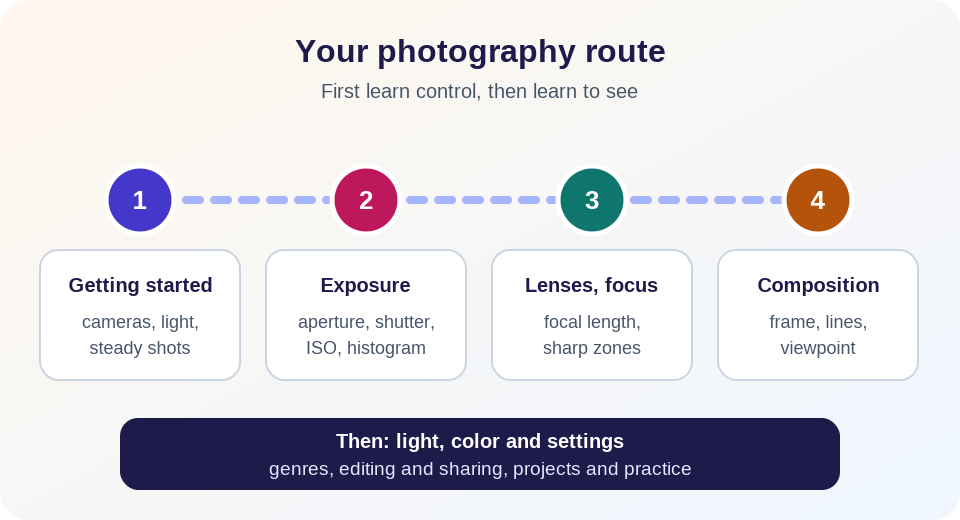
The route through the course
The early chapters give you control. The later chapters use that control.
Getting Started
You learn about the kinds of cameras, how a camera forms a picture and how to hold it steady. These ideas make every later lesson easier.
Exposure
Exposure means how much light you record and how bright the result looks. You will meet aperture, shutter speed and ISO. Each one also changes the look of a picture, not only its brightness. Start with exposure and stops.
Lenses and Focus
You learn what focal length does, which lenses suit which jobs, how autofocus works and how to control the zone that looks sharp.
Composition
Composition is how you arrange things inside the frame. It costs nothing and works with any camera. It begins with the frame and the rule of thirds.
The later chapters
After composition, the course moves on to light, color and camera settings, photography genres, editing and sharing, and projects with practice.
What gear do you need?
Use what you already have. Here is a simple guide.
| You have | What you can practice | What is harder |
|---|---|---|
| A phone | Composition, light, timing, editing | Full manual exposure on some phones |
| A compact camera | Zoom, basic modes, composition | Changing lenses |
| A camera with changeable lenses | Everything in this course | Carrying it everywhere |
Many phones have a "pro" or "manual" mode, or an app that adds one. What you can adjust differs between devices. Some phones cannot change aperture at all. That is fine: you can still learn the idea with the exercises on these pages.
Before you buy anything, take a few hundred photos with your current device. Then you will know which limit really bothers you.
How to practice
Reading about photography helps, but your eye improves mostly by shooting and looking. Try this simple loop.
- Pick one idea. For example, "move closer" or "slow shutter speed".
- Shoot with a goal. Take several versions of one scene and change one thing at a time.
- Review later. Look at the pictures on a bigger screen if you can.
- Name what worked. Write one sentence: "The shot from knee height is better because the background is clean."
- Repeat. Return to the same place or subject another day.
An example practice session
Suppose your idea is "background". You photograph a mug on a table.
- Shot 1: standing, looking down. The table is busy with keys and papers.
- Shot 2: same height, after you clear the table. The mug stands out more.
- Shot 3: crouching, with a plain wall behind the mug. The shape is very clear.
Only a few things changed, so you can tell what made the difference.
Keep a short photo log
A log can be a notebook or a note on your phone. Record the date, the idea you practiced, your best picture and one thing to try next time. After a few weeks you can see your progress clearly, even when it felt slow.
Safety and respect
- Never look at the sun through a camera's optical viewfinder or a lens. Magnified sunlight can seriously damage your eyes. Pointing a camera at the sun for long can also damage the camera. Photographing the sun directly needs proper solar filters and specialist knowledge.
- Watch your feet. It is easy to step backward into traffic, off a curb or near an edge while you look at a screen.
- Ask about people. Rules about photographing people and publishing their pictures differ by country. Private places often have their own rules too. When in doubt, ask first, and respect a "no".
Common mistakes
Waiting for better gear. A new camera does not choose your subject, your light or your timing.
Changing everything at once. If you change distance, light and settings together, you cannot tell what helped.
Only keeping the best shot in mind. Your weak pictures teach you a lot. Look at a few of them and say why they did not work.
Try it
Choose the skill you want to improve. The tool suggests a chapter and a short exercise.
Check your understanding
Quick check · 4 questions
of 4 answered You scored / 4 · perfect!
-
1. What do you need to start most exercises in this course?
A phone is enough for most exercises. A camera with manual controls helps with some of them. -
2. Why change only one thing at a time when you practice?
If one thing changes, you can connect the result to that change. -
3. Which action is unsafe?
Magnified sunlight can seriously damage your eyes. -
4. What is true about rules for photographing people?
Laws and local rules vary, so check the rules where you are and be considerate.
Summary
- Photography is about choices: what to include, when to shoot and how the picture looks.
- The course moves from control (camera, exposure, lenses) to seeing (composition and light), then to genres, editing and projects.
- Start with the device you have.
- Practice one idea at a time, review your pictures and keep a short log.
- Protect your eyes, watch your surroundings and treat people with respect.
Acompanhe seu progresso
Crie uma conta gratuita para marcar lições como concluídas e retomar de onde parou em qualquer dispositivo.