
























Lição 23 · Color and Camera Settings
Color Temperature and White Balance
Learn what color temperature means in kelvin, how white balance presets work, how to set a custom value, and how to handle mixed light sources.
Light has color, even when it looks white to you. Your brain adjusts quickly, so a white shirt looks white in many rooms. A camera must be told, or must guess, what "neutral" means.
That job is called white balance. When it is right for your goal, whites and grays look the way you want. When it is off, a picture can look strongly orange or blue.
What you will learn
- What the kelvin scale describes
- How presets and custom white balance work
- What the tint control does
- How to handle mixed lighting and creative color
The kelvin scale
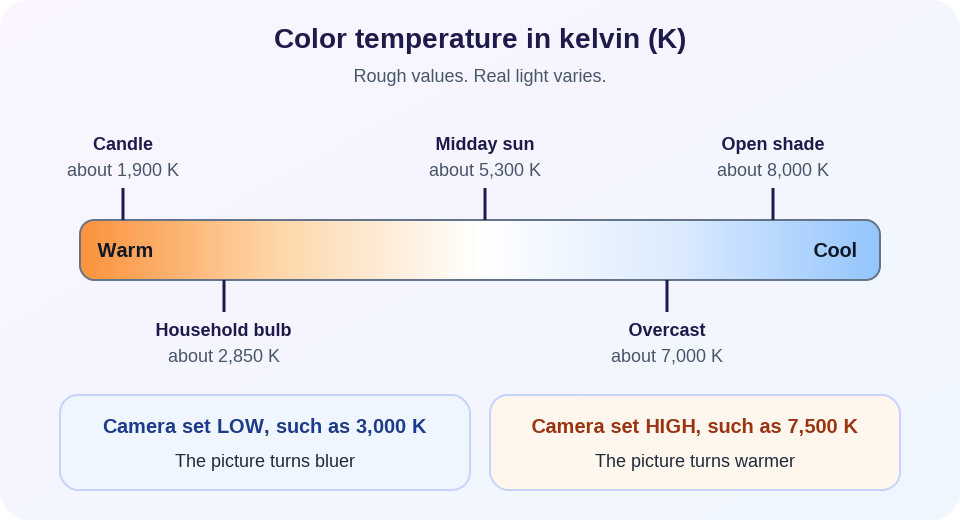
Color temperature is measured in kelvin (K). It describes how warm or cool a light looks. The names can feel backward:
- Low numbers look warm (orange).
- High numbers look cool (blue).
These values are rough guides. Real light varies.
| Light | Rough color temperature |
|---|---|
| Candle flame | about 1,800 to 2,000 K |
| Household incandescent bulb | about 2,700 to 3,000 K |
| Photographic tungsten lamp | about 3,200 K |
| Midday sunlight | about 5,000 to 5,600 K |
| Electronic flash | often about 5,500 to 6,000 K |
| Overcast sky | often about 6,500 to 7,500 K |
| Open shade under blue sky | often 7,000 K or higher |
LED and fluorescent lamps are made in many colors. Check the label and test them.
How the camera setting works
The number you set tells the camera what color the light is. The camera then shifts the picture the opposite way to make it neutral.
- If you set a low value, such as 3,000 K, the camera expects warm light. It makes the picture bluer.
- If you set a high value, such as 7,500 K, the camera expects cool light. It makes the picture warmer.
So on a cloudy day, raising the kelvin setting makes the picture warmer. This surprises many beginners.
Presets
Most cameras offer choices like these, with slightly different names:
- Auto: the camera estimates the light. It often works well but can change between shots.
- Daylight or sunny: for direct sun.
- Cloudy and shade: add warmth for cooler light.
- Tungsten or incandescent: for warm household bulbs.
- Fluorescent: for some fluorescent lamps, which can differ a lot.
- Flash: for flash light.
- Kelvin: you type or dial a number.
- Custom: the camera measures a neutral target.
Tint: green and magenta
The kelvin scale runs between orange and blue. Many lights also lean toward green or magenta. The tint control corrects this second direction. If skin looks slightly green under some lamps, move the tint toward magenta. If it looks too pink, move it toward green.
Custom white balance
For more accurate color, use a gray card that is made to be neutral.
- Place the card where your subject will be, in the same light.
- Follow your camera's custom white balance steps.
- Shoot your subject.
- Repeat when the light changes.
If you shoot raw files, you can also include the card in one test picture. Later, use the white balance picker in your editing software on that card. Then apply the same value to the other pictures taken in the same light.
A random white paper can work in a pinch, but many papers contain brighteners and are not truly neutral. Also avoid a target area that is clipped, meaning pure white with no detail.
Mixed light
Mixed light means two or more colors of light reach your scene. For example, a window and a warm lamp both light a face. One overall white balance setting cannot make both neutral.
Your choices:
- Remove one source: turn off the lamp or close the curtain.
- Match the sources: put a colored filter, called a gel, on a flash. An orange gel helps a daylight-colored flash match tungsten light.
- Move the subject so that one source dominates.
- Keep the mix as a creative choice, such as warm windows against a blue evening.
- Correct parts of the picture separately in editing. This takes more time.
Correct color or expressive color?
Neutral is not always the goal. A sunset should usually keep its warmth. If auto white balance "fixes" it, the picture can lose its mood. Choose Daylight or another fixed setting to keep warm colors. A cooler setting can make a winter scene or a rainy street feel colder.
Be careful where color matters. In product sales, a shirt that looks blue in your photo should not be green in real life. Remember that screens also differ, so no photo shows exactly the same color to every viewer.
Consistency across a set
When you photograph a series in one light, choose a fixed white balance. Then all the pictures match, and one correction fits them all. Auto white balance may shift when the framing or the colors in the scene change.
A worked example: cooking at home
You photograph a meal in the evening under warm bulbs.
- The first shot on Daylight looks very orange.
- Switch to Tungsten. It looks more neutral.
- The plate still looks a bit warm. Try a slightly lower kelvin value.
- The food now looks natural, but a window adds bluer light on one side. Close the curtain.
- Take one extra shot with a gray card.
You solved the problem at the source and made editing easier.
Common mistakes
- Believing that a higher kelvin setting makes pictures bluer. As a camera setting, it makes them warmer.
- Using auto white balance for a series that must match.
- Neutralizing every warm sunset or candle scene.
- Mixing very different light colors and expecting one setting to fix both.
Try it
Choose a starting preset for each light. Real scenes may need small changes.
Check your understanding
Quick check · 4 questions
of 4 answered You scored / 4 · perfect!
-
1. Which light usually has the lowest color temperature?
Warm light has a lower kelvin value. -
2. On a camera, what happens when you raise the white balance kelvin setting?
You tell the camera the light is cooler, so it adds warmth. -
3. Which control corrects a green or magenta color shift?
Tint works along the green-magenta direction. -
4. A face gets cool window light and orange lamp light. What is a simple fix?
One overall white balance cannot neutralize two very different colors at once.
Summary
- Low kelvin light looks warm; high kelvin light looks cool.
- Your setting describes the light, and the camera compensates.
- Tint handles green and magenta shifts.
- Neutral color is useful, but warm or cool color can be a choice.
Acompanhe seu progresso
Crie uma conta gratuita para marcar lições como concluídas e retomar de onde parou em qualquer dispositivo.