
























Bài 10 · Planning Your Time
Plan Your Week
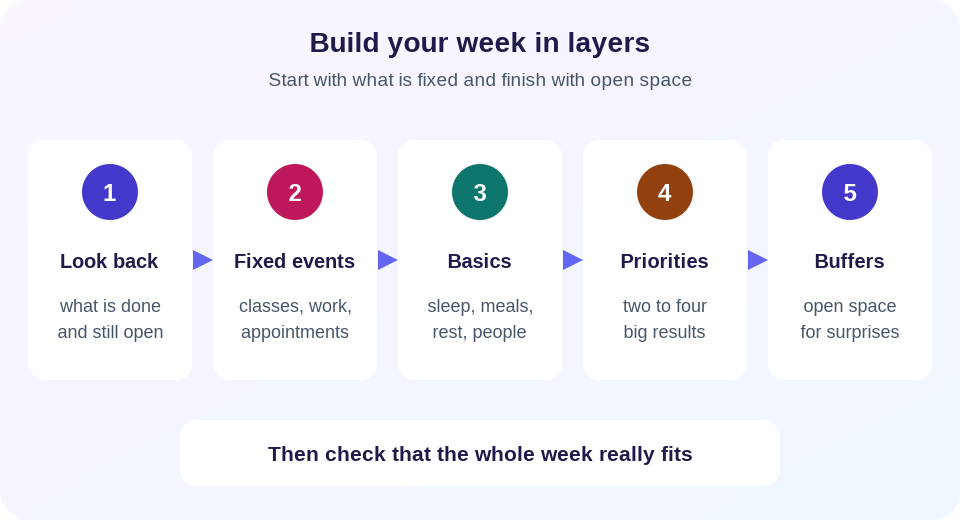
Build a realistic weekly plan step by step: add fixed events, protect rest, place your big priorities first, leave buffer time, and check that it all fits.
A day is often too short for good planning. One busy afternoon can push everything away. A month is often too long to picture clearly. A week is a helpful middle size: it includes workdays and rest days, and you can adjust it quickly.
This lesson gives you a simple weekly planning routine that takes about 20 to 30 minutes once you know it.
What you will learn
- The order for building a weekly plan
- How to protect rest and priorities before small tasks
- Why buffer time matters
- How to adjust a plan during the week
Choose a planning time
Pick a regular moment, such as Friday afternoon, Sunday evening, or Monday morning. Choose a time when you are not exhausted. You need a calendar (paper or digital), your task list, and your goals from the last chapter.
Step 1: Look back briefly
Ask:
- What did I finish last week?
- What is still open?
- Did anything take much longer than expected?
Move unfinished tasks forward only if they still matter. Some can be dropped.
Step 2: Add fixed events
Write down things with a set time: classes, shifts, meetings, appointments, school pickup, and travel to them. Also add known deadlines.
Check the next two or three weeks too. A big deadline next week may need work this week.
Step 3: Protect the basics
Block sleep, meals, and other care for yourself and others. You may not need to write every meal, but make sure the plan leaves real room for them. Add some rest and time with people you care about.
If you plan work first and rest "if there is time," rest often disappears.
Step 4: Place your big priorities
Choose two to four important results for the week. These are often tasks from your focus areas. Examples:
- Finish the first draft of an assignment
- Prepare a client presentation
- Take two walks of 30 minutes
Give each a real time in your calendar. Where you can, put demanding work in your higher-energy hours.
Step 5: Add smaller tasks and buffers
Group small tasks, like paying bills or replying to messages, into a few blocks. Then leave buffer time: open space with no planned task. Buffers absorb late meetings, traffic, tiredness, and work that grows.
How much buffer? It depends on how predictable your life is. If your days change a lot, you need more. Watch your results for a few weeks and adjust.
A worked example
Nadia works Monday to Friday from 09:00 to 17:00 and is studying for a certificate.
| Day | Fixed | Priority block | Other |
|---|---|---|---|
| Mon | Work | Study 19:00-20:00 | Rest after |
| Tue | Work, dentist 17:30 | None | Easy evening |
| Wed | Work | Study 19:00-20:00 | Groceries |
| Thu | Work | None | Dinner with friends |
| Fri | Work | None | Free (buffer) |
| Sat | None | Practice exam 10:00-12:00 | Cleaning 14:00-15:00 |
| Sun | None | None | Walk, weekly plan at 18:00 |
Her priorities are study (two evening sessions plus a practice exam), one dinner with friends, and one walk. Tuesday has a dentist appointment, so she does not plan study then. Friday evening is open. If Wednesday goes badly, she can use Friday or Sunday for the missed study.
Check that it fits
Before you finish, look at the whole week and ask:
- Is there enough time for sleep?
- Is any day packed from morning to night?
- Do deadlines have enough working time before them?
- Where will I recover if something goes wrong?
If it does not fit, remove, shrink, or move something now. It is much easier on Sunday than at midnight on Thursday.
Adjust during the week
A plan is a best guess. When something changes:
- See what is now at risk.
- Keep the most important items.
- Move or shrink others, using your buffer.
- Tell people early if a promise will change.
Changing your plan is part of planning. It is not a sign that the plan failed.
Digital or paper?
Both work. A digital calendar is easy to move and can remind you. Paper makes the week easy to see and has no notifications. Many people use a digital calendar for dates and a paper page for the week's priorities. Choose what you will actually check every day.
A shorter version for busy weeks
On some weeks you may not have 30 minutes. A five-minute version is much better than no plan:
- Look at your fixed events for the next seven days.
- Note any deadline in the next two weeks.
- Write one to three priorities and give each a time.
You can add detail later. Keeping the habit alive in a hard week makes it easier to return to the full routine.
Common mistakes
- Filling every hour, so one delay breaks the whole week.
- Planning only work and forgetting travel, meals, and rest.
- Putting hardest tasks at times when you are usually exhausted.
- Moving the same task week after week without asking why.
- Making a plan and never looking at it again.
Try it
Add blocks to a small weekly budget. The tool shows how much unplanned time is left from your free hours.
Check your understanding
Quick check · 4 questions
of 4 answered You scored / 4 · perfect!
-
1. What should usually go into the weekly plan first?
Fixed events show the time that is already taken. -
2. Why include buffer time?
Open space keeps one delay from breaking the week. -
3. When is it easiest to fix a plan that does not fit?
Early changes give you more choices. -
4. Your Wednesday goes badly. What is a good reaction?
Replanning is a normal part of planning.
Summary
- Plan weekly at a regular, calm time.
- Add fixed events, protect basics, place big priorities, then add small tasks.
- Leave buffer time for the unexpected.
- Check that the week fits before it starts.
- Adjust during the week and keep people informed.
Theo dõi tiến độ của bạn
Tạo tài khoản miễn phí để đánh dấu bài đã học và tiếp tục từ chỗ bạn dừng lại trên mọi thiết bị.