
























Урок 1 · Sound and Digital Audio
Music Production Course Map
See how this music production course works: sound, the DAW, MIDI, recording, rhythm, synthesis, mixing and release, plus how to practice each week.
Music production is the work of turning an idea into a finished recording. One person can now do jobs that once needed a whole team: writing parts, recording them, shaping the sounds, mixing and sharing the result.
That freedom can feel confusing at first. There are many tools, many words and many opinions. This course puts them in a sensible order, so each new topic builds on the one before it.
What you will learn
- What each chapter covers and why the order matters
- What equipment you need to start, and what can wait
- How to practice so that you finish music, not only watch lessons
- How to protect your hearing from the first day
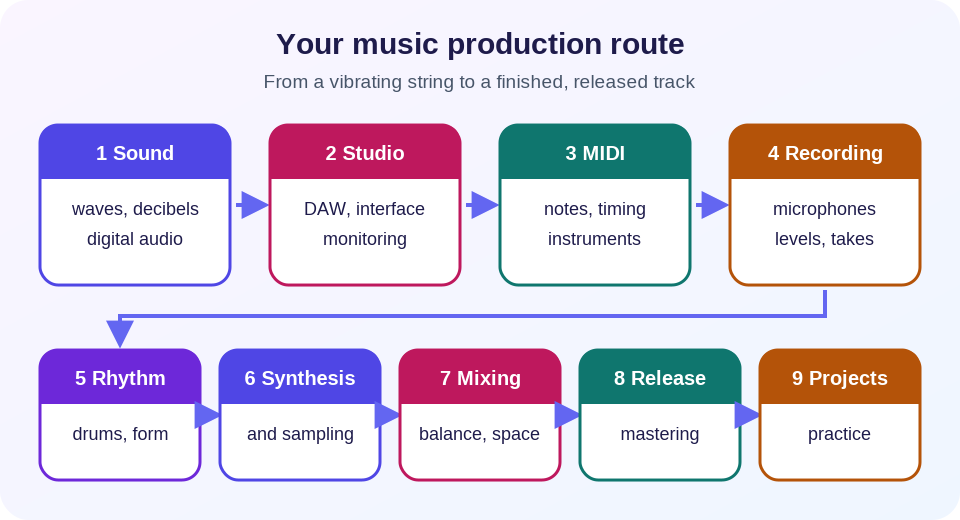
The path through the course
The first four chapters give you the foundations.
- Sound and Digital Audio explains frequency, loudness, tone color and how a computer stores sound. It also covers hearing safety.
- The Studio and the DAW covers your main software, the audio interface, delay between playing and hearing, monitoring and project files.
- MIDI and Instruments shows how notes travel as data and how virtual instruments turn that data into sound.
- Recording covers microphones, placement, levels and how to build a good performance from several takes.
The later chapters cover rhythm and arrangement, synthesis and sampling, mixing, mastering and release, and then projects.
What you need to start
You need less than most advertising suggests.
| Item | Needed at the start? | Why |
|---|---|---|
| A computer | Yes | It runs your software |
| A DAW (digital audio workstation) | Yes | It records, edits and mixes. Free and paid options exist |
| Headphones | Yes | You need to hear detail |
| Audio interface | Later, if you record | It connects microphones and instruments well |
| Microphone | Later, if you record voices or acoustic instruments | Choose it for your source and room |
| MIDI controller | Optional | You can draw notes with a mouse |
| Studio monitors | Optional | Helpful, but your room affects them a lot |
This course teaches ideas that work in any DAW. Menu names and shortcuts differ between programs, so keep your program's own manual nearby.
How to practice
Reading is only the first step. Your ears and hands learn by doing. A simple weekly rhythm works well:
- Learn: read one or two lessons.
- Test: reproduce the main idea in your DAW. For example, after the loudness lesson, change a track level by 6 dB and listen.
- Make: spend most of your time on a small piece of music, such as an eight-bar loop.
- Finish: export the result, even if it is not great. Listen again the next day.
- Note: write down one thing that worked and one thing to try next.
Small finished pieces teach you more than one huge project that never ends.
A worked example: your first week
Suppose you have three hours this week. You might spend 45 minutes reading, 30 minutes trying the idea in your DAW, 90 minutes making a short loop and 15 minutes exporting and writing notes. The exact numbers do not matter. What matters is that making and finishing get the largest share.
How to know you are improving
Progress in production can be hard to feel from day to day. Make it visible. Keep every exported loop in one folder, with the date in the file name. Once a month, listen to an old piece and then a new one at a similar loudness. Ask simple questions. Can you hear each part? Does the timing feel intentional? Does the piece have a clear start and end?
You can also ask a friend for feedback. Ask a specific question, such as "Can you hear the words clearly?" Specific questions bring more useful answers than "Do you like it?"
Protect your ears and your body
Your hearing is your most important tool. Damage can be permanent. Keep your listening level moderate, take breaks and use hearing protection in loud places. The hearing safety lesson explains more. Also sit comfortably and stand up regularly, because long sessions strain your neck, back and wrists.
Respect other people's work
If you use samples, loops or someone else's performance, check that you have permission. Copyright and license rules differ by country, and each sample pack has its own terms. Ask the people you record before you record them, and agree on how the recording may be used.
Common mistakes
- Buying a lot of gear before learning what each item does.
- Trying many DAWs at once instead of learning one well enough to finish music.
- Watching or reading for weeks without making anything.
- Turning the volume higher and higher during a long session.
Try it
Plan your week. Move the sliders and check how much of your time goes into making music.
Check your understanding
Quick check · 4 questions
of 4 answered You scored / 4 · perfect!
-
1. Which item can usually wait if you only make music with virtual instruments?
Virtual instruments make sound inside the computer, so you do not need a microphone to use them. -
2. Which habit teaches you the most over time?
Finishing makes you practice every stage and shows you what to improve. -
3. Before you use a sample from a pack in your release, what should you do?
Terms differ between packs and rules differ by country. Changing a sample does not automatically give you permission. -
4. Why does this course avoid menu names?
The concepts carry over, while the exact menus differ from one program to another.
Summary
- The course moves from sound basics to recording, then rhythm, synthesis, mixing and release.
- A computer, a DAW and headphones are enough to begin.
- Spend most practice time making and finishing small pieces.
- Protect your hearing from the start.
- Check permission for samples and recordings.
Отслеживайте прогресс
Создайте бесплатный аккаунт, чтобы отмечать пройденные уроки и продолжать с того места, где остановились, на любом устройстве.