
























レッスン 12 · MIDI and Instruments
MIDI Messages Explained
Learn what MIDI is and is not: note on and note off messages, note numbers, channels, connections, General MIDI drums and standard MIDI files, with examples.
MIDI stands for Musical Instrument Digital Interface. It is a standard that lets keyboards, drum pads, synthesizers and software exchange musical instructions. It was introduced in the early 1980s and is still central to music production.
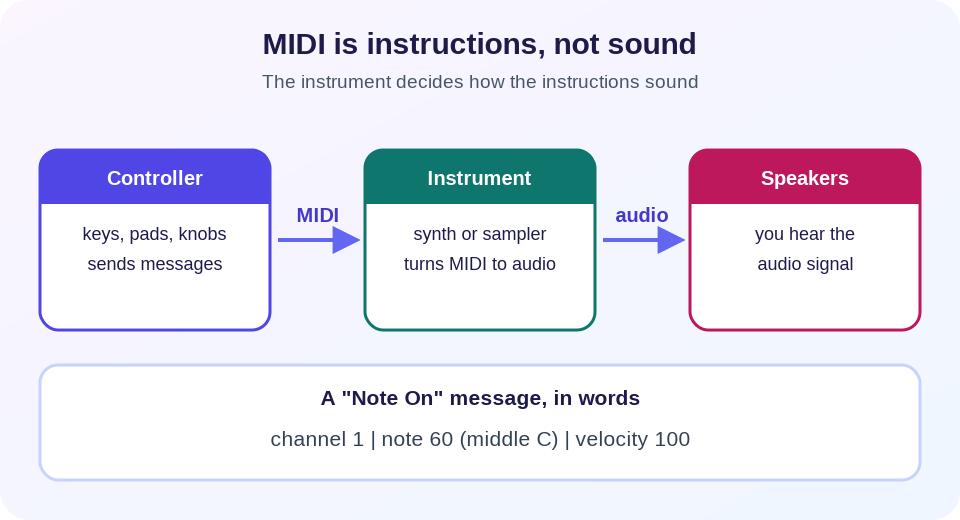
The most important fact comes first: MIDI is not audio. A MIDI message says something like "start this note this strongly". Something else must turn it into sound.
What you will learn
- The difference between MIDI data and audio
- How note messages and note numbers work
- What channels are for
- How MIDI devices connect and how MIDI files are used
MIDI compared with audio
| MIDI | Audio | |
|---|---|---|
| Contains | Events, such as notes and control moves | A recording of a sound wave |
| Change the instrument later? | Yes, easily | No, the sound is recorded |
| Change one note's pitch? | Easy | Possible with special tools, with limits |
| File size | Very small | Much larger |
| Sounds the same everywhere? | No, it depends on the instrument | Mostly, apart from playback equipment |
Think of MIDI as a written instruction list and audio as a recording of a performance.
Note On and Note Off
When you press a key, the controller usually sends a Note On message. When you release it, it sends a Note Off message. A basic Note On carries:
- the channel
- the note number
- the velocity, which usually reflects how fast you hit the key
In MIDI 1.0, a Note On with velocity 0 is treated as a Note Off.
If a Note Off is lost, a note may keep sounding. This is a stuck note. Many DAWs and devices have a panic button that sends messages to stop sounding notes.
Note numbers
MIDI 1.0 note numbers go from 0 to 127. Each step is one semitone. Important landmarks:
| Note number | Meaning |
|---|---|
| 60 | Middle C |
| 69 | The A above middle C (A4, usually 440 Hz) |
| 72 | The C one octave above middle C |
With standard 440 Hz tuning in equal temperament:
frequency = 440 × 2^((note − 69) ÷ 12)
DAWs label octaves differently. Some call note 60 "C4", while others call it "C3". The note number stays the same, so check it when parts seem to be in the wrong octave.
Channels
MIDI 1.0 has 16 channels on each connection or port. A channel lets different instruments share one cable or port. A synth set to channel 2 can ignore messages on channel 1. Many receivers can also listen to all channels.
If your keyboard plays nothing, a channel mismatch is one thing to check. Other checks:
- Is the device detected by the computer or instrument?
- Is the right MIDI input selected in the DAW?
- Is the track set to receive it?
- Does the track have an instrument?
Connections
- 5-pin DIN is the classic MIDI connector. It carries data in one direction, so you often see ports labeled IN, OUT and sometimes THRU. Connect OUT of one device to IN of the next. THRU passes on a copy of what arrives at IN.
- TRS MIDI uses small stereo-style jacks on some devices. Wiring has not always been the same between makers, so use the correct adapter.
- USB carries MIDI between many controllers and computers. A computer normally acts as the USB host. Two USB MIDI devices often cannot talk to each other without a host.
- Bluetooth MIDI exists, but wireless links can add delay or timing variation.
A MIDI cable is not an audio cable. A hardware synth needs its audio output connected to your interface if you want to record its sound.
General MIDI and drums
General MIDI (GM) is a specification that gives a common set of instrument sounds and drum note numbers. On GM devices, channel 10 is used for percussion. Some familiar GM drum notes:
| Note | Drum sound |
|---|---|
| 36 | Bass drum |
| 38 | Acoustic snare |
| 42 | Closed hi-hat |
| 46 | Open hi-hat |
| 49 | Crash cymbal |
Many drum plugins and drum machines use their own layouts, so check the map.
Program changes and MIDI files
A Program Change message asks an instrument to switch to another stored sound. Its effect depends on the instrument.
A Standard MIDI File (usually .mid) stores MIDI events with timing and can include tempo information and track names. It does not include the instrument sounds. The same file can sound very different on two systems.
MIDI 2.0
A newer generation, MIDI 2.0, adds features such as much higher resolution and two-way communication between devices. Support varies between hardware and software, and MIDI 1.0 remains common. This course uses MIDI 1.0 values.
A worked example
You play a bass line on a keyboard into an instrument track. You like the notes but not the sound. You swap the synth bass for a sampled electric bass. The notes stay the same, and the new instrument plays them. Then you move one wrong note up a semitone by dragging it. With an audio recording, both changes would be much harder.
Common mistakes
- Expecting a MIDI cable to carry sound.
- Exporting only a MIDI file and expecting others to hear your exact sounds.
- Ignoring channel settings when a device stays silent.
- Trusting octave names across programs instead of checking note numbers.
Try it
Convert MIDI note numbers to note names and frequencies. This tool labels note 60 as C4.
Check your understanding
Quick check · 4 questions
of 4 answered You scored / 4 · perfect!
-
1. What does a MIDI Note On message contain?
MIDI carries instructions, not audio. -
2. Which MIDI note number is middle C?
Note 60 is middle C, and note 69 is A4. -
3. How many channels does a MIDI 1.0 port have?
MIDI 1.0 provides 16 channels per port. -
4. You connect a hardware synth with only a MIDI cable and hear nothing in the DAW. What is a likely missing step?
MIDI cables carry no audio, so the synth's sound needs its own audio connection.
Summary
- MIDI carries musical instructions, not sound.
- Note messages include channel, note number and velocity.
- Note 60 is middle C, though octave labels vary.
- MIDI 1.0 offers 16 channels per port.
- MIDI files need an instrument to produce sound.