
























Lezione 1 · Design Foundations
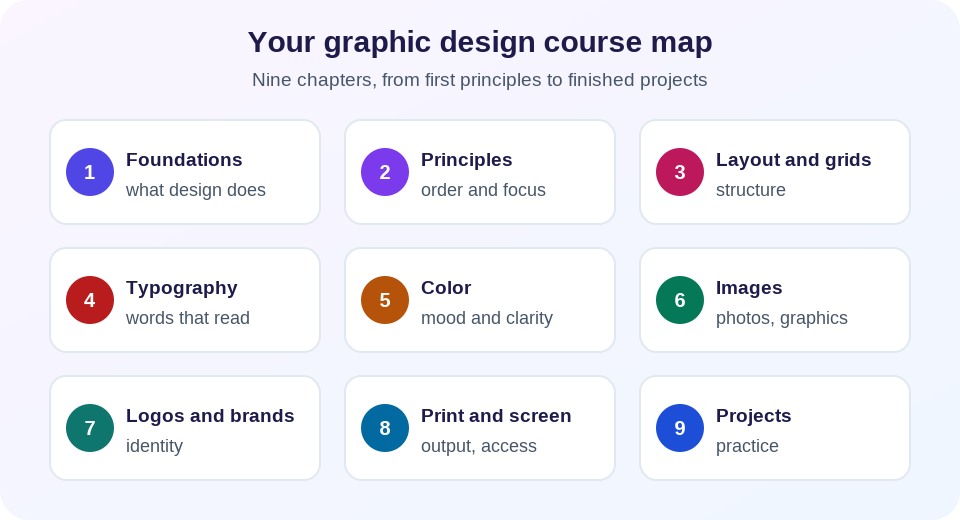
Graphic Design Course Map
See the full graphic design course path, from principles, grids and type to color, logos and output, and learn how to practice so your skills really grow.
Graphic design is the work of arranging words, images and shapes so that people understand a message. You see it on bus signs, app screens, food packages, posters and slides. Good design helps people act. Weak design makes them guess.
This course starts at the beginning. You do not need to draw well, and you do not need any special software to follow the ideas.
What you will learn
- How the nine chapters fit together
- Which tools you need (very few)
- How to practice so that you improve
- How to start a design journal
The path through the course
| Stage | Chapters | Main question |
|---|---|---|
| Think | Design Foundations, Principles of Design | What should people notice, and why? |
| Build | Layout and Grids, Typography | Where does everything go, and how does it read? |
| Enrich | Color, Images and Graphics, Logos and Branding | How should it look and feel? |
| Deliver | Print, Screen and Accessibility, Projects and Practice | Will it work for real people in real places? |
Take the chapters in order if you are new. Each one uses words from the chapters before it. If you already design, jump to the topic you need and use the quizzes to find gaps.
What each early chapter gives you
- Design Foundations shows you how to define a job before you decorate it.
- Principles of Design gives you names for the choices that create order.
- Layout and Grids helps you place content with a clear structure.
- Typography teaches you to make words easy to read.
What you need
Ideas come before tools. For most exercises, paper and a pencil are enough. A phone or computer helps you collect examples. When you want to build digital layouts, any program that lets you place text and shapes will work. Paid and free tools both exist. Their menus change over time, so this course teaches concepts that stay true in any of them.
Sketch first. Small, rough drawings let you test many layouts in the time it takes to polish one on screen.
How to practice
Reading about design is like reading about swimming. You also need to get in the water. Use this simple loop:
- Look. Pick one real design, such as a sign or a flyer.
- Name. Say what you notice first, second and third.
- Explain. Guess which choices caused that order.
- Remake. Sketch your own version with one thing changed.
- Compare. Decide what got better and what got worse.
A worked example
You find a flyer for a book sale. First you notice a large stack of books. Second, you read the words "Book Sale". After that, your eye wanders. The date is tiny and sits between other small text.
Your explanation is that the date has the same size and weight as everything around it. Your remake gives the date more space and a bolder style. When you compare, the date is now easy to find, and the picture is still the first thing you see.
Notice that you did not say "it looks bad". You said what happened to your eyes, and then you looked for a cause. That habit is the heart of design practice.
A second example: change one thing
Take a simple name badge. The name is small, and the company name is large. At a meeting, people want to read the name. Swap the two sizes. Then ask what you lost. The company is now less visible, but the badge does its main job better. Many design decisions are trades like this.
Start a design journal
Keep a notebook or a folder. For each entry, write:
- the date and where you saw the example
- three observations about what your eye did
- one choice you think works, and why
- one idea you would like to try
After a few weeks you will see patterns in what works for you.
When you copy a layout to study it, keep it as private practice. Do not publish it as your own work. Rules about copyright differ by country, so check them before you reuse anyone's images, fonts or artwork.
How to use each lesson
Read the lesson, then do the Try it exercise before the quiz. After that, spend ten minutes on paper using the same idea. If a quiz answer surprises you, read the explanation and find the part of the lesson it comes from. Short, regular sessions usually work better than one very long one.
Your first journal entry
Do this today. It takes about ten minutes.
- Find a printed or digital design near you, such as a food label or a bus notice.
- Look at it for three seconds, then look away. Write down what you remember.
- Look again. List the facts the design wants you to know.
- Circle any fact that you missed the first time.
- Write one sentence about why you might have missed it.
Keep this entry. When you finish the course, return to the same design. You will probably have more precise words for what you see, such as contrast, grouping or line length. That change is a useful sign of progress.
Common mistakes
- Starting in software before you know the message.
- Collecting pretty examples without asking why they work.
- Deciding after one attempt that you have no talent. Skill grows with repeated practice and feedback.
Try it
Match each question to the chapter that helps you answer it.
Check your understanding
Quick check · 4 questions
of 4 answered You scored / 4 · perfect!
-
1. What is the main goal of graphic design?
Design arranges words, images and shapes so that the message is understood. -
2. What is a good first step before you open any software?
The message comes first, and rough sketches let you test ideas quickly. -
3. Which comment is the most useful in your design journal?
It describes what happens to the viewer and suggests a cause you can test. -
4. You copied a poster layout to learn from it. What should you do with it?
Study copies are for learning. Copyright rules differ by country.
Summary
- Graphic design arranges content so that people understand and can act.
- The course moves from thinking, to building, to enriching, to delivering.
- Paper and a pencil are enough for most early practice.
- Practice with a loop: look, name, explain, remake, compare.
- A design journal turns everyday examples into lessons.
Next: What Is Graphic Design?
Tieni traccia dei progressi
Crea un account gratuito per segnare le lezioni completate e riprendere da dove avevi lasciato su qualsiasi dispositivo.