
























Leçon 15 · Task Systems
Build a Task System You Trust
Set up a simple task system with one inbox, a calendar, clear lists, and a weekly check, so you no longer need to hold every task and reminder in your head.
"Don't forget to call the school." "Buy batteries." "Send that file." If you keep these in your head, they pop up at random moments, often when you cannot act on them. Some get lost completely.
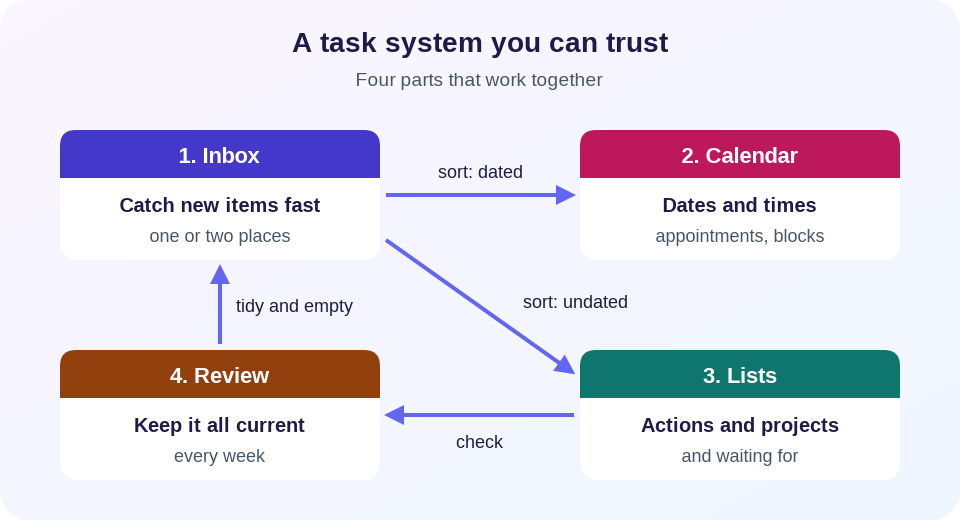
A task system is a small set of places and habits that remember things for you. It does not have to be fancy. It has to be one you trust and use.
What you will learn
- The four parts of a simple task system
- What belongs in each part
- How to choose tools without overthinking
- How to build trust in your system
The four parts
| Part | Job | Example |
|---|---|---|
| Inbox | Catch new items quickly | A notes app page or a small notebook |
| Calendar | Hold things tied to a date or time | Dentist at 15:00 on the 12th |
| Lists | Hold tasks and projects without a set time | "Buy batteries" |
| Review | Keep everything current | 20 minutes each week |
The inbox
The inbox is a temporary holding place. When a task or idea appears, put it there at once. Do not sort it yet. You will sort it later.
Keep the number of inboxes small. If notes live in your email, three apps, paper scraps, and your memory, you must check all of them. One or two inboxes are much easier.
You cannot remove every inbox. Email and work chat will bring requests too. What you can do is move real tasks from them into your system.
The calendar
Use the calendar for things that must happen on a certain day or at a certain time:
- Appointments, classes, and meetings
- Deadlines
- Time blocks you plan for important work
- Date-based reminders, such as "renew library books"
If your calendar fills with "maybe" tasks, you may stop trusting it. Keep it honest.
The lists
Lists hold actions without a fixed time. Useful lists include:
- Next actions: things you can do soon
- Projects: results that need more than one step
- Waiting for: things you expect from others
- Someday or maybe: ideas you are not committing to now
- Shopping or errands: if useful
You may need fewer lists. Start with next actions, projects, and waiting for.
The review
Without a review, lists grow old and you stop believing them. Once a week, empty your inbox, check your calendar, and update your lists. You will learn more about review habits later in the course.
Choose tools simply
A tool should be:
- Quick to capture into, so you actually use it
- Available where you need it
- Easy to see, so you notice what matters
- Safe enough for the information you put in it
Paper has no battery and no notifications. Digital tools can search, remind, and sync. Both are fine. Do not put passwords, bank details, or private information about other people into a task tool that is not meant for it. At work, follow your employer's rules about which tools and data are allowed.
Many people change apps often. Before switching, ask: "Is the problem the tool, or that I have not reviewed it?"
A worked example
Fatima is a parent who works part-time. Her system:
- Inbox: a single note on her phone
- Calendar: a shared family calendar for school events and shifts
- Lists: Next actions, Projects, Waiting for
- Review: Sunday after breakfast, 20 minutes
On Tuesday she remembers three things while cooking: "school photo form," "ask Dad about weekend," and "fix kitchen drawer." She adds all three to the inbox in 20 seconds and returns to cooking. On Sunday, the form goes into Next actions with its deadline on the calendar. The question to Dad becomes a message she sends, then a "waiting for" item. The drawer goes into Projects, because she must first find the right screws.
Build trust slowly
Trust grows when the system proves itself:
- Capture every time, even tiny things, for two weeks
- Look at your calendar each day
- Look at your next actions when you have free time
- Review weekly, even briefly
If something slips through, do not give up. Ask where it entered your life and why it did not reach your inbox. Then fix that one gap.
Keep it light
A system should take much less time than the work it supports. Signs it is too heavy:
- You avoid adding tasks because it takes many steps
- You spend long sessions moving items between folders
- You have more tags and colors than tasks
Remove parts you never use.
Your first week
Set up the system in a single short session, then use it before you improve it:
- Choose your inbox and put it where you can reach it quickly.
- Spend ten minutes writing down every open task you can think of.
- Move dated items into your calendar.
- Put a review time in the calendar for one week from today.
The first list may look long or uncomfortable. Seeing it does not create new work. It only shows work that was already there, and now you can choose what to do about it.
Common mistakes
- Keeping some tasks in the system and others only in your head.
- Using many inboxes that you never check.
- Filling the calendar with tasks that have no real time.
- Building a complex system before you have used a simple one.
- Never reviewing, so the lists become stale.
Try it
Decide where each item should go first.
Check your understanding
Quick check · 4 questions
of 4 answered You scored / 4 · perfect!
-
1. What is the main job of an inbox?
Sorting comes later; capture comes first. -
2. Which item belongs in the calendar?
It is tied to a date and time. -
3. What goes on a waiting-for list?
The list helps you follow up. -
4. What keeps a system trustworthy?
Review keeps lists current and believable.
Summary
- A task system remembers things so your head does not have to.
- The four parts are inbox, calendar, lists, and review.
- Keep few inboxes and an honest calendar.
- Choose a quick, available, and safe tool.
- Keep the system light and fix gaps one at a time.
Suivez votre progression
Créez un compte gratuit pour cocher vos leçons et reprendre où vous vous étiez arrêté, sur n'importe quel appareil.