
























Lektion 34 · Practice and Review
Daily and Weekly Reviews
Use a short daily review and a calm weekly review to update your lists, learn from what really happened and choose the next priorities before the days fill up.
Plans get old quickly. Meetings move, tasks take longer, new requests arrive and some goals stop mattering. A system that you never update slowly stops being true. When you stop trusting it, you stop using it.
A review is a planned time to update your system and learn from it. It connects everything in this course: goals, plans, lists, focus and energy.
What you will learn
- A short daily review
- A step-by-step weekly review
- Questions that help you learn without blame
- How to keep reviews small enough to repeat
The daily review
A daily review can take about five to ten minutes. Do it at the end of the workday or study day, or in the morning if that suits you better.
- Check what is done. Mark finished tasks.
- Catch loose ends. Add new tasks and promises from your notes and messages.
- Look ahead. Check tomorrow's appointments and deadlines.
- Choose. Pick one main task and a small number of others.
- Set the start. Write the first action for the main task.
If you do this at the end of the day, it can also help you stop. The open items are written down, so you do not have to hold them all in your mind.
If your days are very different from each other, keep the same five steps and let the time move. A shift worker might review after each shift. A student might review after the last class. The steady part is the order of the steps, not the hour on the clock.
The weekly review
The weekly review looks wider. Set a regular time when interruptions are less likely. It might take 20 to 60 minutes, depending on your life. Use three stages.
Stage 1: get current
- Collect notes, papers and messages that contain tasks.
- Update your task lists. Delete what no longer matters.
- Check the past week for follow-ups you promised.
- Check your waiting list.
- Look at the next two or three weeks on your calendar for preparation you need.
Stage 2: learn
Ask a few questions and write short answers:
- What moved forward?
- What did not, and why?
- Where did my estimates differ from reality?
- What drained me, and what restored me?
- What is one thing to change next week?
Stage 3: choose
- Name up to three priorities for the week.
- Put time for them in your calendar.
- Check that the plan fits your real free time, with buffers.
- Move or renegotiate what does not fit.
See making a weekly plan for more on this last stage.
Look for causes, not blame
"I failed again" gives you nothing to change. Describe what happened, and then look for a cause.
| What happened | Possible cause | One change to try |
|---|---|---|
| The essay did not move | No first action was written | Write the first action on Friday |
| Plans broke every afternoon | No buffer for urgent requests | Leave one hour open |
| I skipped exercise all week | The time clashed with pickup duty | Choose a different cue and time |
| I worked late three nights | I accepted extra tasks without checking | Check capacity before saying yes |
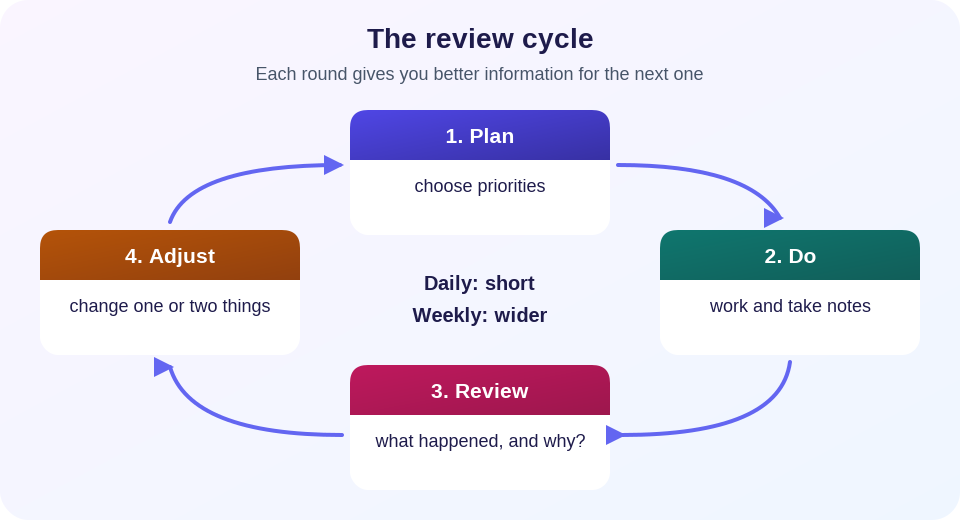
Change one or two things at a time. Then check next week whether they helped. Plan, do, review, adjust: you can repeat this loop for as long as it is useful.
Notice what worked
Reviews are not only for problems. Ask what made a good day good. Did you start before opening messages? Did a friend work beside you? Was the first action already written? A thing that worked once is worth trying again on purpose.
Check your goals sometimes
Every month or every few months, look further. Are your goals still yours? Has your situation changed? Are some projects asking for time with little value? It is fine to pause or end a goal for a good reason. If others depend on it, tell them.
Example: Hassan's weekly notes
Hassan writes: "Moved: two chapters of notes. Stuck: lab write-up, because I did not understand the graph question. Estimate: reading took twice as long as I planned. Energy: football helped; two late nights hurt. Change: ask about the graph on Monday."
His note is short. It gives him a clear action and a better estimate for next week.
Keep it light
A review that is too long gets skipped. If you have little time, do this five-minute version:
- Check the calendar for the next seven days.
- Pick three priorities.
- Write the first action for each.
If you miss a week, do not try to rebuild every day you missed. Collect what is open now and start from today.
Link the review to a steady cue, such as your last drink on Friday afternoon or a quiet time at the weekend. Choose a day that suits your own week.
Common mistakes
- Turning the review into a long session of redesigning your system.
- Copying unfinished tasks forward week after week without asking why.
- Writing only what went wrong and ignoring what worked.
- Planning a full week with no space for surprises.
Try it
Answer the review prompts. The tool turns your answers into a short note that you can copy onto paper. Nothing is saved when you leave the page.
Check your understanding
Quick check · 4 questions
of 4 answered You scored / 4 · perfect!
-
1. What is the main purpose of a review?
A review keeps the system true and turns experience into better plans. -
2. Which belongs in a daily review?
Daily reviews are short and focus on what is close. -
3. A task has been moved forward for four weeks. What is a good step?
A repeating delay is information that calls for a decision. -
4. You missed your last two weekly reviews. What is best?
A simple restart brings your system up to date quickly.
Summary
- A daily review updates loose ends and sets tomorrow's start.
- A weekly review gets current, learns and chooses.
- Look for causes and change one or two things.
- Check your bigger goals from time to time.
- Keep a short version for busy weeks.
Verfolge deinen Fortschritt
Erstelle ein kostenloses Konto, hake Lektionen ab und mach auf jedem Gerät dort weiter, wo du aufgehört hast.